 IT-школа
Video Editing Mistakes — 5 Beginner Errors
Video Editing Mistakes: What Beginners Do Wrong
Video editing is more than just cutting clips together. However, at the beginning, most students make common video editing mistakes that reduce the overall quality of their projects. Let’s look at the main beginner editing mistakes that happen most often and how to avoid them.
1. Overloading with Effects and Transitions
One of the main video editing mistakes is using too many transitions, animations, and filters. Beginners often try to “decorate” their videos, but this distracts from the content. High-quality video editing requires restraint and logic: every effect should support the idea, not overpower it.
2. Ignoring Sound Editing
Even beautiful visuals cannot save a video with poor sound quality. Common video editing mistakes include background noise, sudden volume changes, or music that overpowers the voice. When learning video editing, it is essential to understand basic audio correction and sound balance.
3. Lack of Structure
Another common video editing mistake is presenting material in a chaotic way. When clips are arranged without logic, it becomes difficult for the viewer to understand the main idea of the video. The result may look like a collection of random fragments, even if the footage itself is high quality.
Every video should have a clear structure: a short introduction that presents the topic, a main part that develops the idea, and a logical conclusion. Without this structure, the video feels unfinished and loses its coherence.
To avoid this video editing mistake, it is important to create a simple plan or script before starting the editing process. Even a few key points help determine which clips to keep, in what order to arrange them, and how to build smooth transitions between sections. A structured approach makes editing clearer and the final video more professional.
4. Poor Video Pacing
Very long pauses or extremely fast cuts make a video difficult to watch. Beginner video editing should always consider comfortable pacing for the audience. It is important to learn how to “feel” the rhythm and keep only the necessary clips.
5. No Basic Color Correction
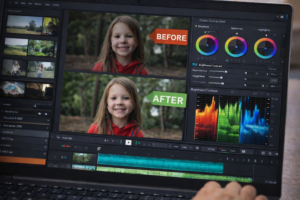
Beginners often ignore color correction, thinking it is too complex or unnecessary. However, working with color significantly influences how a video is perceived. Even well-shot footage can look dull or unprofessional if brightness, contrast, and white balance are not adjusted.
Common video editing mistakes at this stage include overly dark images, overexposed areas, unnatural skin tones, or noticeable color differences between shots. These inconsistencies create an impression of carelessness and distract viewers from the content.
Basic color correction includes:
-
adjusting brightness and contrast;
-
correcting white balance;
-
improving saturation levels;
-
matching clips to a consistent visual style.
Even small adjustments can make a video look more professional, cohesive, and visually appealing. When teaching video editing to children, it is important to explain that color correction is not about adding effects, but about improving quality and viewer comfort. Proper color work enhances the mood of the video and makes it more enjoyable to watch.
How to Learn Video Editing Properly
To avoid video editing mistakes, it is important to learn systematically and complete practical tasks. At GoMother, children take a blogging course where they study video editing online — from structuring a video to working with sound and visual style.
Video Editing Mistakes: Conclusion
Video editing mistakes are a natural part of the learning process. The key is to understand them and gradually improve your skills. With the right approach and consistent practice, a child can quickly move from amateur clips to confident, high-quality video editing. You can sign up for a free trial lesson online or visit us near Akademmistechko.